
Download CalcMadeEasy Pro – Multipurpose Calculator, Financial, Scientific, Unit Conversion Tool
Overview
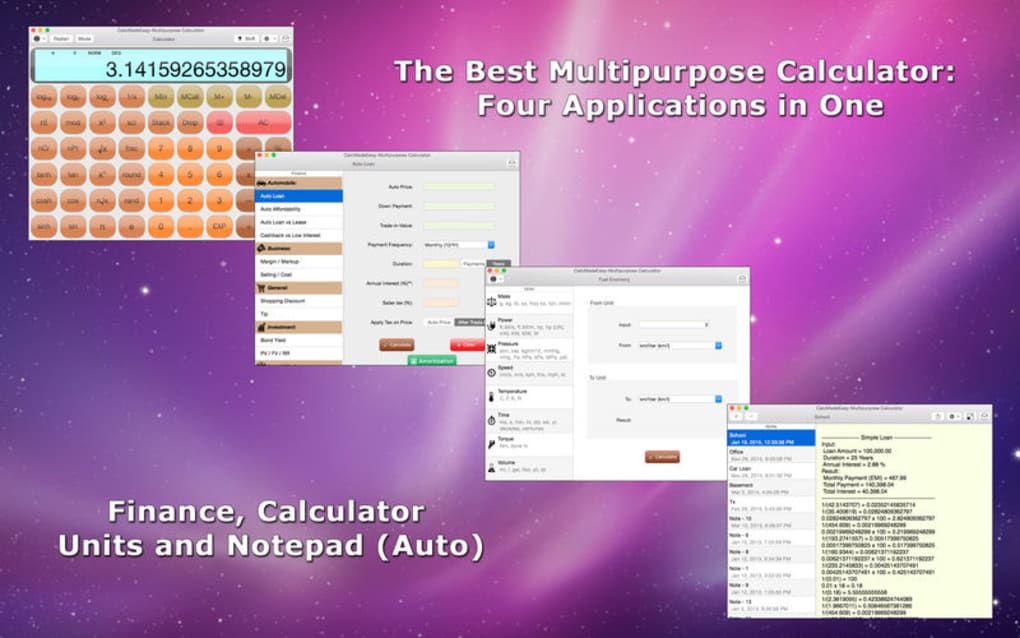
CalcMadeEasy Pro is a robust, all‑in‑one calculator app that brings together financial, scientific, and everyday conversion tools under a single, sleek interface. Designed for both casual users and power professionals, the app eliminates the need to juggle multiple utilities by offering a unified workspace that automatically records every calculation in a shareable note. Whether you are drafting a home‑budget spreadsheet, evaluating a car loan, solving complex trigonometric equations, or converting currencies while traveling, CalcMadeEasy Pro adapts to the task at hand.
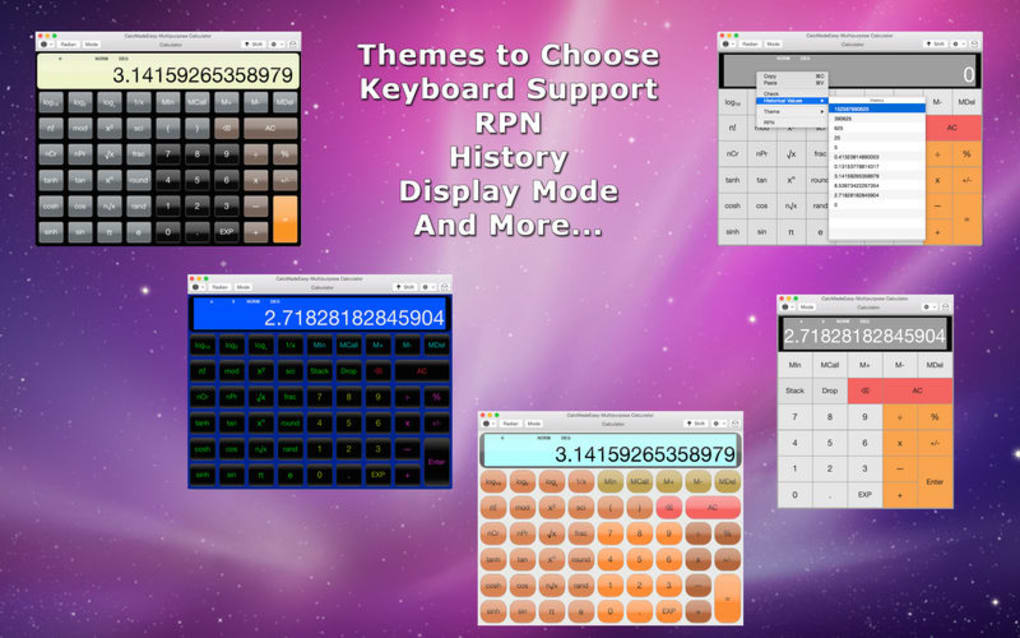
Its innovative Reverse Polish Notation (RPN) engine provides direct stack manipulation, giving users granular control over multi‑step calculations. The app also shines in its customizability—users can toggle themes, switch on or off the auto‑note feature, and personalize unit‑conversion presets to match their workflow. Because it lives on the App Store, you receive regular, secure updates that keep the tool aligned with the latest OS standards and security protocols.
In short, CalcMadeEasy Pro is more than a calculator; it’s a decision‑making companion that turns raw numbers into actionable insights.
Key Features and Functional Benefits
- Financial Suite: Amortization tables, loan‑refinance calculators, budgeting templates, and interest‑rate converters—all built‑in for quick money‑management decisions.
- Scientific Engine: Supports trigonometric, logarithmic, statistical, and complex‑number operations with high‑precision output.
- RPN Stack Control: Direct access to stack values, allowing you to delete, swap, or reorder entries without leaving the calculation screen.
- Automatic Note‑Taking: Every input and result is captured in an auto‑generated note that can be exported, shared, or saved for future reference.
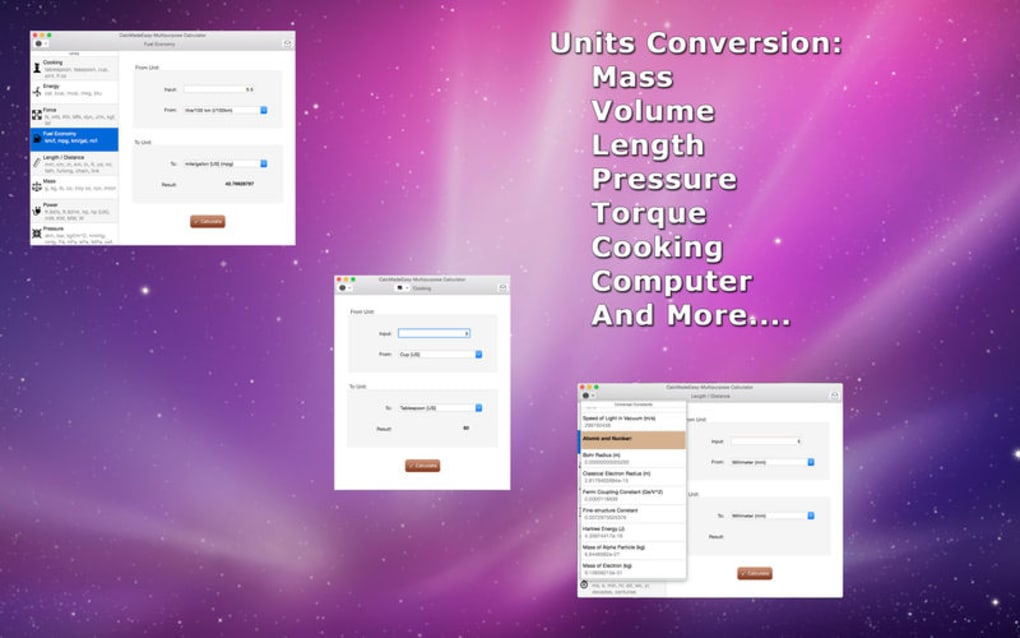
- Unit Conversion Hub: Over 150 conversion categories—currency, length, weight, temperature, and more—ideal for travelers and engineers alike.
- Custom Themes & UI Settings: Light, dark, and high‑contrast themes plus the ability to hide the note‑taking pane for a distraction‑free environment.
- Secure Cloud Sync: Optional iCloud sync ensures your calculation history is backed up and accessible across all your Apple devices.
- One‑Tap Sharing: Export notes as PDF, plain text, or copy directly to the clipboard for instant collaboration.
Each of these features works together to reduce the friction often experienced when moving between separate apps. For example, you can calculate a mortgage payment, instantly convert the result to a different currency, and then share the entire workflow with a spouse or financial advisor—all without leaving CalcMadeEasy Pro. The RPN stack is particularly valuable for engineers who need to perform iterative calculations; it eliminates the repetitive entry of intermediate results, thereby saving time and reducing the chance of manual error. Meanwhile, the automatic note‑taking function doubles as a lightweight audit trail, helping users comply with personal finance best practices or professional reporting standards. The combination of high‑precision scientific tools, comprehensive financial calculators, and a versatile conversion library makes CalcMadeEasy Pro a true multipurpose powerhouse.
Installation, Usage Instructions, and Compatibility
Getting started with CalcMadeEasy Pro is straightforward. Follow these steps to download, install, and begin using the app on your device:
- Open the App Store on your iPhone, iPad, or Mac.
- Search for CalcMadeEasy Pro or click the direct link provided on the developer’s website.
- Tap the Get button, then authenticate with Face ID, Touch ID, or your Apple ID password.
- Once the download completes, the app icon will appear on your home screen or Applications folder.
- Launch the app and grant permissions for notifications and iCloud sync if you wish to back up your notes.
Upon first launch, you’ll be greeted with a brief onboarding tutorial that walks you through the four main modes: Financial, Scientific, RPN, and Unit Conversion. The tutorial also explains how to enable or disable the automatic note‑taking feature. After the tutorial, you can customize the theme and adjust preferences under the Settings menu, which is accessible via the gear icon in the top‑right corner.
Operating System Compatibility (itemprop="operatingSystem"): CalcMadeEasy Pro supports iOS 14.0 and later, iPadOS 14.0 and later, as well as macOS 11 (Big Sur) and newer. The app is optimized for both Apple Silicon and Intel‑based Macs, ensuring smooth performance on the latest hardware. Because the app runs natively on Apple platforms, you can expect fast launch times, responsive touch gestures on iPhone/iPad, and full keyboard shortcuts on macOS for power users.
For best results, keep the app updated through the App Store. Updates often include new conversion categories, enhanced security patches, and performance optimizations that keep the calculator running efficiently even when handling large data sets or complex scientific equations.
Pros, Cons, and Frequently Asked Questions
Pros
- All‑in‑one solution eliminates the need for multiple separate apps.
- Automatic note‑taking creates a searchable audit trail for all calculations.
- RPN stack offers advanced users precise control over multi‑step operations.
- Extensive unit conversion library covers over 150 categories.
- Customizable UI with dark mode and high‑contrast themes.
- Secure iCloud sync keeps your notes backed up across devices.
- One‑tap sharing makes collaboration effortless.
Cons
- Only available on Apple platforms; no native Windows or Android version.
- Advanced RPN features may have a learning curve for beginners.
- Full feature set requires a one‑time purchase; free version is limited.
- Automatic notes can consume storage if not regularly cleaned.
FAQ
Can I use CalcMadeEasy Pro offline?
Yes. All calculation engines and unit‑conversion tables are stored locally, so you can work without an internet connection. Cloud sync and sharing features require a connection.
Is there a free trial available?
CalcMadeEasy Pro offers a 7‑day free trial via the App Store. During the trial you have access to all premium features, after which you can purchase the full license.
How does the automatic note‑taking work?
Every time you enter a value or press =, the app logs the input and the resulting output in a chronological note. You can view, edit, or export these notes from the “History” tab.
Can I customize the unit‑conversion categories?
Yes. Users can add custom conversion factors, rename categories, and reorder the list to suit personal preferences via the Settings → Conversions menu.
Is my data secure when using iCloud sync?
All data synced to iCloud is encrypted both in transit and at rest using Apple’s end‑to‑end encryption. The app does not store any personal information on external servers.
Overall, CalcMadeEasy Pro earns high marks for its versatility, ease of use, and thoughtful design. Professionals who regularly juggle financial projections, scientific calculations, and everyday conversions will find the integrated workflow invaluable. While the lack of Windows or Android support may limit cross‑platform teams, the depth of features on iOS/macOS more than compensates for this gap.
Conclusion and Call‑to‑Action
CalcMadeEasy Pro stands out in a crowded marketplace of niche calculators by delivering a truly multipurpose experience. Its blend of financial tools, scientific precision, RPN flexibility, and extensive unit conversion makes it a single destination for anyone who needs to turn numbers into clear, shareable decisions. The automatic note‑taking feature not only boosts productivity but also provides a transparent record that can be archived or shared with teammates, spouses, or advisors.
With regular, secure updates from the App Store and seamless iCloud integration, you can trust that the app will remain reliable for years to come. If you’re looking for a download that combines power, convenience, and security—all without the hassle of managing multiple apps—CalcMadeEasy Pro is the answer. Download CalcMadeEasy Pro today from the App Store, start your free trial, and experience how a single calculator can simplify every calculation you encounter.







